
Jaywan
Accept Jaywan card payments in the United Arab Emirates with Tap Payments.
Jaywan Payment Integration
Jaywan is the UAE's national card payment scheme, designed to enable secure, efficient, and locally processed card transactions.
As of October 7, 2026, Jaywan has been automatically enabled for eligible UAE merchants using Tap Payments.
Merchants can accept payments made with eligible Jaywan cards through supported Tap payment integrations. Most integrations require no additional changes.
1. Overview
What is Jaywan?
Jaywan is the United Arab Emirates' national card payment scheme, owned and operated by Al Etihad Payments (AEP), a subsidiary of the Central Bank of the UAE.
It is designed to strengthen the UAE's domestic payment infrastructure by enabling local card transaction processing through UAESWITCH.
Key Features
- National Payment Scheme: Developed specifically for the UAE payment ecosystem.
- Local Processing: Domestic transactions are processed through UAESWITCH.
- Card Support: Supports eligible debit and prepaid cards, with additional card products subject to issuer availability.
- Co-badged Cards: Supports co-badging arrangements with international card networks, including Mastercard and Visa.
- Seamless Integration: Compatible with supported Tap Payments integrations.
- Automatic Activation: No additional activation request is required for eligible merchants.
International acceptance of co-badged Jaywan cards depends on the issuing bank and the applicable international card network.
Note: Jaywan and Aani are separate payment solutions. Jaywan is a card payment scheme, while Aani is an instant account-to-account payment service.
2. Availability & Activation
Automatic Activation
Jaywan has been automatically enabled for eligible UAE merchant accounts using Tap Payments since October 7, 2026.
If your merchant account is eligible and already accepts card payments through Tap, no additional activation request is required.
Do I Need to Update My Integration?
For most merchants, no integration changes are required.
However, merchants using Tap's Apple Pay Web SDK must upgrade to the supported SDK version and update their supported card brands configuration.
3. Integration Compatibility
| Integration Method | Required Action |
|---|---|
| Charges API | No changes required |
| Card SDK | No changes required |
| Checkout SDK | No changes required |
| Apple Pay Web SDK (Tap SDK) | Upgrade to v1.3.0 and add JAYWAN to supported brands |
| Google Pay SDK (Direct Integration) | Not currently supported |
Important: Jaywan acceptance depends on merchant eligibility and the supported payment integration. Automatic activation does not imply support across every payment method.
4. Apple Pay Web SDK Integration
Merchants integrating directly with Tap's Apple Pay Web SDK must complete the following steps to support Jaywan.
Step 1: Upgrade to Apple Pay SDK v1.3.0
Jaywan support is available starting from Apple Pay SDK v1.3.0, released on September 20, 2026.
Choose one of the installation methods below.
Option A: Using npm
Install the supported SDK version:
npm install @tap-payments/[email protected]Option B: Using CDN
Alternatively, include the following script in your HTML file:
<script src="https://cdn.tap.company/tap-sdks/apple-pay/build-1.3.0/main.js"></script>Step 2: Update Supported Card Brands
Add JAYWAN to the acceptance.supportedBrands configuration in your Apple Pay SDK integration.
For example, if your existing configuration supports Visa and Mastercard, update it as follows:
const acceptance = {
  supportedBrands: [
    "VISA",
    "MASTERCARD",
    "JAYWAN"
  ]
};
Important: This example demonstrates the supported card brands configuration only. Keep all other required SDK parameters and initialization logic unchanged.
Step 3: Verify Your Integration
After upgrading the SDK and updating the configuration:
- Confirm your integration uses Apple Pay SDK v1.3.0 or a later version that supports Jaywan.
- Verify that
JAYWANis included inacceptance.supportedBrands. - Confirm that Jaywan is enabled for your merchant account.
- Validate the integration using an eligible Jaywan payment method in a supported environment.
For Sandbox test card details and transaction verification, refer to Section 6: Sandbox Testing.
5. Google Pay SDK Support
Status: Not Currently Supported
Jaywan is not currently supported through Tap's direct Google Pay SDK integration.
The required SDK version and configuration changes have not yet been confirmed.
Merchants should not assume that their existing Google Pay SDK integration supports Jaywan cards.
This documentation will be updated once support becomes available and the integration requirements are confirmed.
6. Sandbox Testing
You can test Jaywan card payments in Tap's Sandbox environment before accepting live transactions.
Sandbox Test Card
The following Jaywan test card has been confirmed to work in Sandbox:
| Field | Value |
|---|---|
| Card Number | 6690109000011008 |
| Expiry Date | 01/39 |
| CVV | 100 |
How to Test
Step 1: Configure Your Sandbox Environment
Ensure that you are using your Tap Sandbox API credentials and a supported Jaywan payment integration.
Step 2: Initiate a Test Payment
Create a payment using the Jaywan test card details provided above.
Step 3: Complete the Payment
Follow the applicable payment authentication flow and complete the transaction.
Step 4: Verify the Transaction
After completing the payment, retrieve the transaction details using the Tap API.
For a successful payment, verify that:
- The transaction status is
CAPTURED. - The card scheme is identified as
JAYWAN. - The amount and currency match the original payment request.
For details on identifying Jaywan in API responses, refer to Section 7: Identifying Jaywan Cards in API Responses.
Additional Test Scenarios
The following cards have also been provided for Jaywan Sandbox testing. However, their expected results are still being validated.
| Card Number | 3DS Status | Last Known Result |
|---|---|---|
6690109000011016 | Enrolled | Captured |
6690109000011024 | Enrolled | Authentication Failed (516) |
6690109000011032 | Enrolled | Authentication Failed (516) |
6690109000011057 | Not Enrolled | Declined |
6690109000011065 | Not Enrolled | Declined |
7. Identifying Jaywan Cards in API Responses
Jaywan cards can be identified through card scheme information returned in Tap's payment response.
Card Scheme Identification
The following fields may be returned for Jaywan transactions:
| Field | Expected Value |
|---|---|
card.scheme | JAYWAN |
card.brand | LOCAL |
card.category | Jaywan Standard (example) |
card.first_six | 669009 (example) |
The primary identifier is card.scheme = JAYWAN.
The card category and first six digits may vary depending on the issuing bank and card product.
Example Charges API Response
The following simplified JSON illustrates the relevant fields used to identify a Jaywan transaction:
{
  "status": "CAPTURED",
  "currency": "AED",
  "card": {
    "scheme": "JAYWAN",
    "brand": "LOCAL",
    "category": "Jaywan Standard",
    "first_six": "669009"
  }
}
Note: This is an illustrative example, not a complete Charges API response. The exact fields returned may vary depending on the payment integration.
Apple Pay Token Identification
For Jaywan cards used through Apple Pay, the payment token may contain the following card network information:
{
  "paymentMethod": {
    "network": "Jaywan"
  }
}
This value identifies Jaywan as the card network associated with the payment method.
Note: This example represents payment token metadata and should not be confused with the Tap Charges API response structure.
Checkout Supported Payment Methods
Where supported, the checkout configuration may identify Jaywan among the available payment methods:
{
  "supported_payment_methods": [
    "JAYWAN"
  ]
}
This indicates that Jaywan is included among the supported payment methods.
Important: The examples above illustrate potential identification fields. The exact response structure, field availability, and supported payment methods depend on the integration method and API configuration.
8. Payment Rules & FAQs
This section outlines the payment processing rules and answers frequently asked questions about accepting Jaywan payments through Tap Payments.
8.1 Payment Processing
Jaywan follows the standard payment processing and settlement rules applicable to your Tap merchant account.
| Feature | Jaywan Support |
|---|---|
| Supported Currency | AED only |
| Full Refunds | Supported |
| Partial Refunds | Supported |
| Refund Restrictions | No additional Jaywan-specific restrictions or time limits; follows the same general rules as Visa and Mastercard |
| Settlement Schedule | Follows the merchant's existing settlement schedule |
| Settlement Requirements | Same as Visa and Mastercard |
| Transaction Fees | Existing merchant agreement applies; no change to current domestic card processing fees |
8.2 Activation & Integration
Is Jaywan automatically enabled?
Yes. Jaywan has been automatically enabled for eligible UAE merchants using Tap Payments since October 7, 2026. No separate activation request is required.
Do I need to update my existing integration?
For most merchants, no integration changes are required.
- Charges API, Card SDK, and Checkout SDK: No changes required.
- Apple Pay Web SDK: Upgrade to v1.3.0 or later and include
JAYWANin the supported brands configuration. - Google Pay SDK (Direct Integration): Jaywan is not currently supported.
For implementation details, refer to Section 3: Integration Compatibility and Section 4: Apple Pay Web SDK Integration.
Does Jaywan support Apple Pay?
Yes. Jaywan support is available through Tap's Apple Pay Web SDK starting from version 1.3.0. Merchants using the SDK directly must add JAYWAN to acceptance.supportedBrands.
Does Jaywan support Google Pay?
Jaywan is not currently supported through Tap's direct Google Pay SDK integration. Support information will be updated when available.
8.3 Card Acceptance & Checkout
What types of Jaywan cards are supported?
Jaywan supports eligible debit, credit, and prepaid cards, subject to issuer and card product availability. Some Jaywan cards may also be co-badged with international card networks.
Can Jaywan cards be used internationally?
Some Jaywan cards are co-badged with international networks, such as Mastercard and Visa. International acceptance depends on the issuing bank and applicable card network arrangements.
How does Jaywan appear on the Checkout page?
Jaywan is supported through Tap's existing card payment experience for eligible merchants. The Jaywan logo appears alongside other supported card brands, such as Visa, Mastercard, American Express, and mada. Customers can enter their Jaywan card details directly into the existing card payment form.
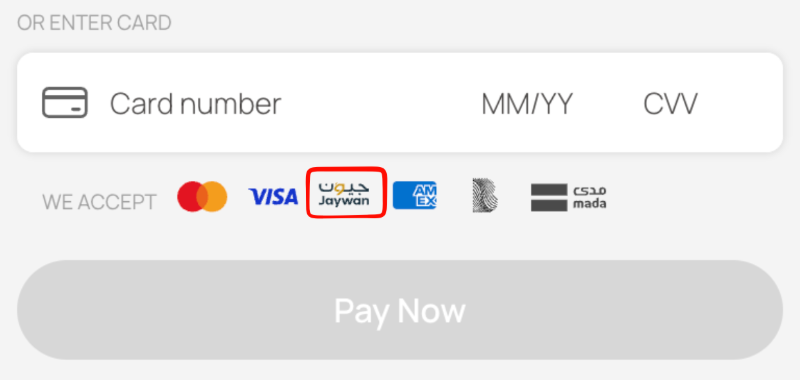
No separate payment option or additional Checkout integration is required.
Updated 4 days ago